 Learn Arabic
You’ve learned Arabic letters on paper — or you’re ready to start — but the moment you sit down at a keyboard, everything stops. The keys are labeled in English, you have no idea which key produces which Arabic letter, and switching between the two languages mid-sentence feels like a separate skill entirely.
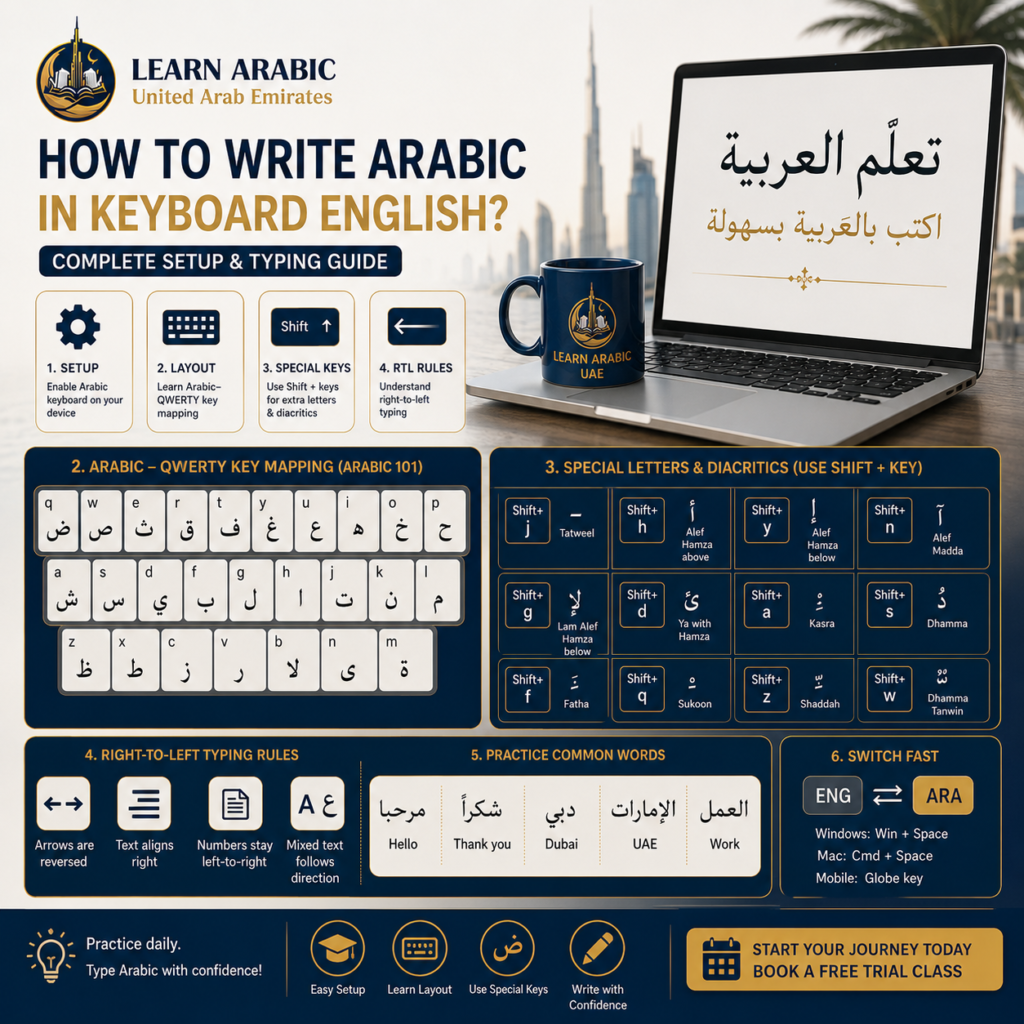
Writing Arabic using an English keyboard works through a remapping system: every key on your existing QWERTY keyboard is assigned an Arabic letter, following the Windows Arabic keyboard layout standard. When you switch your input language to Arabic, pressing “b” no longer types “b” — it types ل (Lam). Pressing “q” types ض (Dad).
This remapping is not random. It follows a standardized layout used across the Arabic-speaking world, called the Arabic 101 keyboard layout (sometimes labeled “Arabic (101)” in system settings). Once you learn this layout, it applies to every device, every operating system, and every Arabic typing context — email, WhatsApp, government portals, professional documents.
The foundational rule: you are not typing transliteration (writing Arabic sounds using English letters). You are switching your keyboard’s output language entirely. Every Arabic letter has one assigned key. Learning those assignments is the entire task.
1. Enable the Arabic Keyboard on Your Device
Before you can type in Arabic, you’ll need to enable the Arabic keyboard on your device. The setup only takes a few minutes, and after that, you can switch between Arabic and English with a single shortcut.
How do you add Arabic keyboard on Windows?
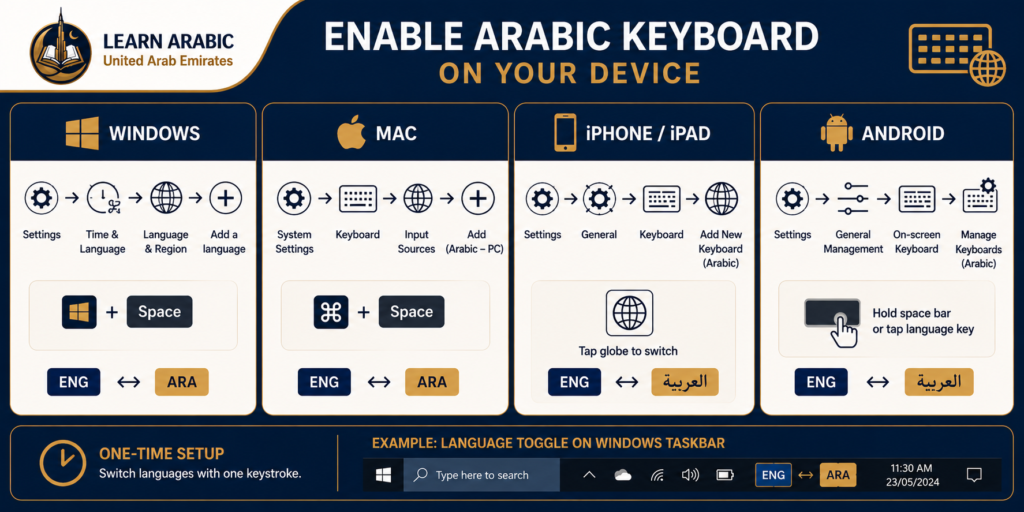
Go to Settings → Time & Language → Language & Region → Add a language. Search for “Arabic” and select “Arabic (United Arab Emirates)” or “Arabic (Egypt)” — both use the same keyboard layout. Once installed, press Windows key + Space to toggle between English and Arabic input. A language indicator appears in your taskbar showing “ENG” or “ARA.”
How do you add Arabic keyboard on Mac?
Go to System Settings → Keyboard → Input Sources → click the “+” button. Search “Arabic” and add “Arabic — PC” — this layout matches the Windows standard and is the most widely compatible option. Toggle between languages with Command + Space or the input menu in the menu bar.
How do you add Arabic keyboard on iPhone or iPad?
Go to Settings → General → Keyboard → Keyboards → Add New Keyboard. Select “Arabic.” Once added, the globe icon on your keyboard switches between English and Arabic input with a single tap.
How do you add Arabic keyboard on Android?
Go to Settings → General Management → Language and Input → On-screen Keyboard → Manage Keyboards. Enable “Arabic.” On the keyboard itself, press and hold the space bar or tap the language key to switch.
One-time setup: Once Arabic is added to any device, switching takes one keystroke. The setup above is a single 3-minute process you never repeat.
2. Learn the Arabic–QWERTY Key Mapping
This is the core of how to write Arabic in keyboard English — knowing which key produces which Arabic letter. The standard Arabic 101 layout assigns letters as follows:
| English Key | Arabic Letter | Name |
| q | ض | Dad |
| w | ص | Sad |
| e | ث | Tha |
| r | ق | Qaf |
| t | ف | Fa |
| y | غ | Ghain |
| u | ع | Ain |
| i | ه | Ha (soft) |
| o | خ | Kha |
| p | ح | Ha (emphatic) |
| a | ش | Shin |
| s | س | Sin |
| d | ي | Ya |
| f | ب | Ba |
| g | ل | Lam |
| h | ا | Alef |
| j | ت | Ta |
| k | ن | Nun |
| l | م | Mim |
| z | ظ | Dha |
| x | ط | Ta (emphatic) |
| c | ز | Zayn |
| v | ر | Ra |
| b | لا | Lam-Alef ligature |
| n | ى | Alef Maqsura |
| m | ة | Ta Marbuta |
most learners try to memorize this entire table at once, then abandon typing Arabic within a week. The effective method is to learn the 10 most frequent Arabic letters first — ا، ل، م، ن، ي، ت، ب، ر، ع، س — which appear in the majority of Arabic words, and build from there. Frequency-first learning gets you typing real words within days, not weeks.
Master Arabic Writing in the UAE with a FREE Trial Class

See Our Classroom Environment in Action
Experience a sneak peek into our live sessions. Watch the video below to see our specialized instructors interacting with students, breakdown complex texts, and cultivate an engaging, respectful learning environment.
Master Arabic in the UAE
Experience world-class Arabic language training designed for students and professionals in the Emirates.
Book Your Free TrialRead More: Arabic Writing Practice In The UAE
3. Type the Letters That Don’t Appear on Standard Arabic Keys
Several Arabic letters and diacritical marks require the Shift key or specific key combinations. These are the characters beginners most often skip — producing Arabic text that is missing critical letters.
| Shift + Key | Arabic Character | Name |
| Shift + j | ـ | Tatweel (elongation dash) |
| Shift + h | أ | Alef with Hamza above |
| Shift + y | إ | Alef with Hamza below |
| Shift + n | آ | Alef Madda |
| Shift + g | لإ | Lam + Alef with Hamza below |
| Shift + d | ئ | Ya with Hamza |
| Shift + w | ٌ | Dhamma Tanwin |
| Shift + e | ً | Fatha Tanwin |
| Shift + r | ٍ | Kasra Tanwin |
| Shift + a | ِ | Kasra (short vowel) |
| Shift + s | ُ | Dhamma (short vowel) |
| Shift + f | َ | Fatha (short vowel) |
| Shift + q | ْ | Sukoon |
| Shift + z | ّ | Shaddah |
The letters أ (Alef with Hamza above), إ (Alef with Hamza below), and ا (plain Alef) are three distinct characters with different grammatical roles. Typing the wrong one is a spelling error — and it is the mistake Arabic learners make most consistently.
The rule: Alef with Hamza above (أ) appears at the start of a word when the vowel is Fatha or Dhamma. Alef with Hamza below (إ) appears at the start of a word when the vowel is Kasra. Plain Alef (ا) functions as a long vowel inside or at the end of a word. Getting these right requires understanding Arabic grammar, not just key positions — which is exactly why typing and grammar instruction belong together.
Getting comfortable with these Shift combinations is where a structured Arabic self-paced course accelerates progress significantly: you learn the grammatical rules behind which Hamza form to use, not just where the key sits.

4. Understand Right-to-Left Typing Behavior
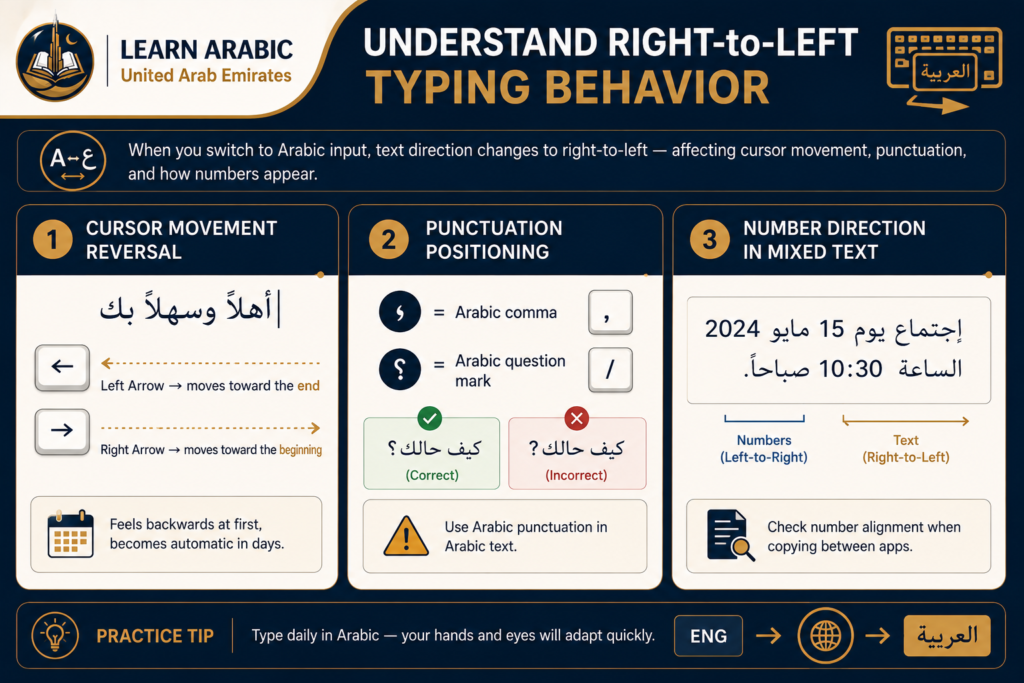
When you switch your keyboard to Arabic input, your text direction switches automatically to right-to-left. This affects more than just the letters — it affects the entire paragraph direction, cursor movement, and document flow.
Three behaviors catch beginners off guard:
A. Cursor movement reversal
The left arrow key moves your cursor toward the end of an Arabic word (right-to-left reading direction). The right arrow key moves toward the beginning. This feels backwards initially and becomes automatic within a few days of consistent practice.
B. Punctuation positioning
Arabic punctuation marks — the Arabic comma (،) and Arabic question mark (؟) — are mirrored versions of their English counterparts and sit on the same keys (comma and forward slash respectively, depending on the OS). Using English punctuation inside Arabic text is a formatting error that appears in professional correspondence more often than it should.
C. Number direction in mixed text
When you type numerals inside Arabic text, numbers follow left-to-right logic within a right-to-left paragraph. Most word processors and email clients handle this automatically, but formatting breaks can occur when copying Arabic text between applications. Always check number alignment before sending formal documents.
Read More: How Do You Write the Date in Arabic?
Step 6: Use On-Screen Keyboard References While Learning the Layout
Until the Arabic–QWERTY mapping is memorized, use your operating system’s on-screen keyboard as a visual reference — not as a typing tool. Typing with a virtual on-screen keyboard is slower than handwriting. Its value is as a lookup tool while your muscle memory builds.
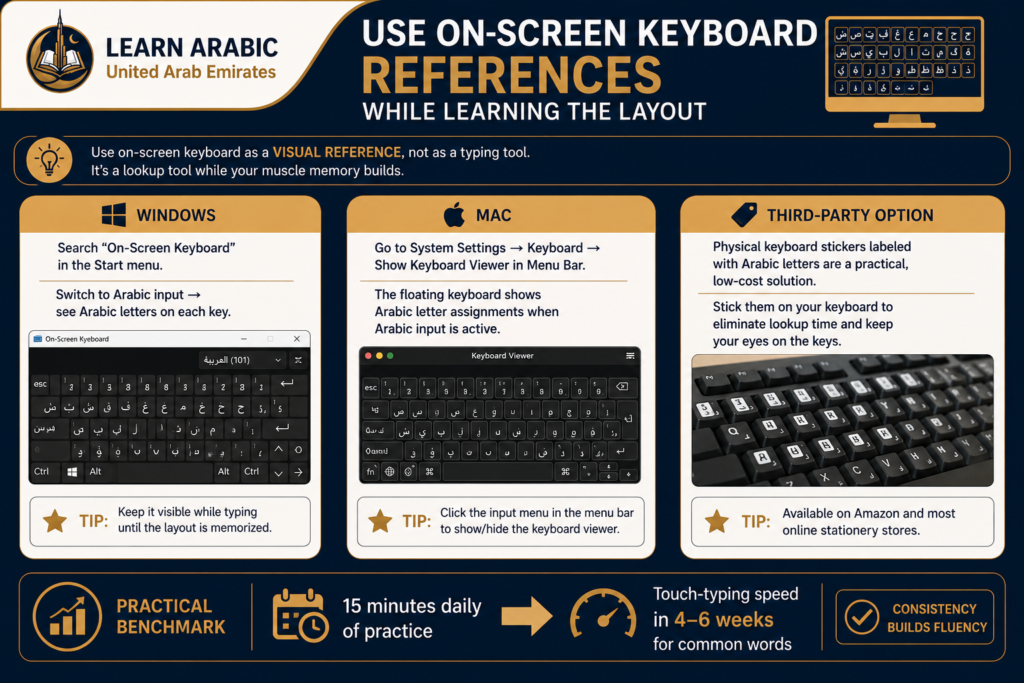
Windows: Search “On-Screen Keyboard” in the Start menu. Switch it to Arabic input and it displays the Arabic letter on each key in real time.
Mac: Go to System Settings → Keyboard → Show Keyboard Viewer in Menu Bar. The floating keyboard shows Arabic letter assignments when Arabic input is active.
Third-party option: Physical keyboard stickers labeled with Arabic letters are another practical option — available on Amazon and most online stationery retailers for low cost. Sticking them on your existing keyboard eliminates lookup time entirely and lets your eyes stay on the keys while learning.
The practical benchmark for layout memorization: most learners who practice typing Arabic for 15 minutes daily reach touch-typing speed for common words within four to six weeks.
Why Handwriting Arabic Before Typing It Matters?
There is a persistent assumption among beginners that typing Arabic is a shortcut around handwriting practice. The output quality difference proves otherwise.
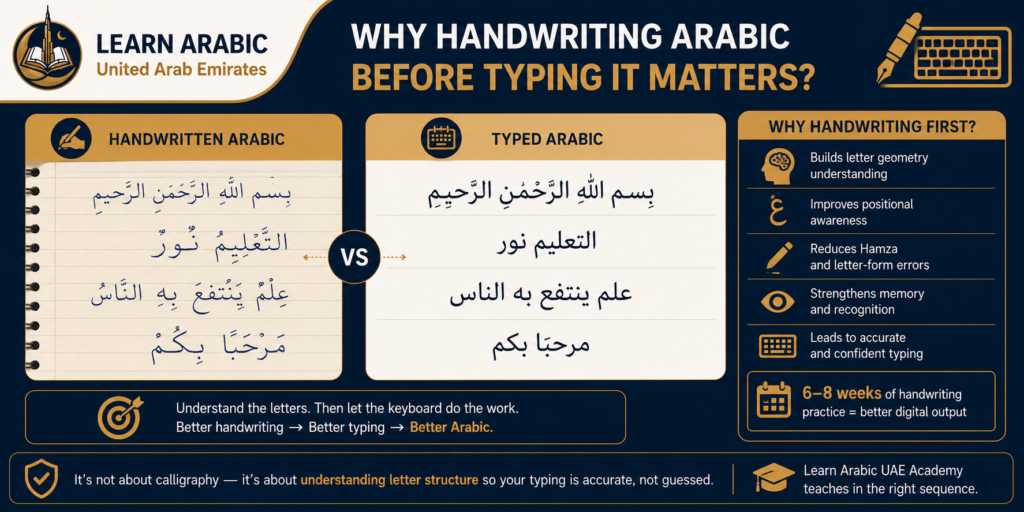
Learners who type Arabic before developing any handwriting fluency consistently make more Hamza errors, choose incorrect letter forms, and omit short vowels — because they learned key positions without internalizing the underlying letter geometry. They know where “u” sits on the keyboard but not that عـ looks different at the start of a word than ـعـ in the middle. That positional distinction exists in typed Arabic too, and the keyboard handles it automatically only if the typist knows which letter to choose.
Six to eight weeks of Arabic handwriting practice before transitioning to digital typing produces noticeably more accurate keyboard output. This is not about calligraphy — it is about understanding letter structure well enough that digital choices become deliberate rather than guessed. The Learn Arabic UAE academy sequences handwriting and typing instruction for exactly this reason.
Step Inside Our Classrooms
Don’t just take our word for it—see our community in action. Click below to watch real, live snippets from our recent classes and experience our engaging teaching style firsthand!
Master Arabic in the UAE
Experience world-class Arabic language training designed for students and professionals in the Emirates.
Book Your Free TrialRead more: The Best Way to Learn Arabic Vocabulary
Build Professional Arabic Typing Skills with Learn Arabic UAE
The key mapping above gives you the technical setup. What it cannot give you is the grammatical knowledge behind when to use أ versus إ versus ا, when Tanwin applies, and how formal email structure differs from informal messaging — the layer that separates functional Arabic typing from professional written Arabic.
Learn Arabic UAE offers structured Arabic writing and typing instruction with native instructors, UAE-specific curriculum, and flexible scheduling for working professionals. Whether you’re starting from the alphabet or refining your professional correspondence, instruction that corrects your output from the first week is what accelerates progress past the plateau that self-study reliably hits.

Our Arabic courses
- Arabic Course in the UAE
- Quranic Arabic Course
- Fusha Arabic Course
- Classical Arabic Course
- Emirati Arabic Course
- Gulf Arabic Course
- Learn Saudi Arabic
- Business Arabic Course UAE
- Arabic Language Classes for Professionals in UAE
Master Arabic in the UAE
Experience world-class Arabic language training designed for students and professionals in the Emirates.
Book Your Free TrialConclusion
Writing Arabic on an English keyboard is a learnable, standardized skill. The Arabic 101 layout maps every Arabic letter to a specific QWERTY key, Shift combinations handle diacritical marks and Hamza variants, and right-to-left behavior becomes natural within days of consistent use. Initial setup takes under five minutes on any device.
What takes longer — and what determines whether your typed Arabic is actually accurate — is understanding the grammar behind your letter choices. The keyboard does not know which Alef form belongs in a word; you do. Building that knowledge through structured instruction is what separates beginners who type Arabic from those who write it correctly.
The sequence that works is the same one that works for handwriting: letters first, then words, then sentences, then professional register. Digital Arabic typing is the output layer of a writing skill — not a shortcut around it.
Frequently Asked Questions About How to Write Arabic on an English Keyboard
Which Arabic keyboard layout should I use?
The Arabic 101 layout is the standard option and the correct choice for most learners. When adding Arabic input in Windows or Mac settings, select “Arabic (101)” or “Arabic — PC.” This layout is consistent across all major operating systems and is the one used in professional and educational Arabic typing contexts worldwide.
How do I switch between Arabic and English while typing?
On Windows: Windows key + Space. On Mac: Command + Space or the menu bar input selector. On iPhone/iPad: tap the globe icon . On Android: press and hold the space bar. In all cases, a language indicator confirms which input is active — always check it if your output looks wrong before retyping.
Why does my Arabic text appear going the wrong direction in some apps?
Right-to-left text requires the application to support bidirectional (BiDi) text rendering. Microsoft Word, Google Docs, Gmail, Outlook, and all major browsers support this fully. Problems occur when pasting Arabic text into applications not designed for it — certain legacy systems or basic text editors. The fix is to use a BiDi-compatible application or enable right-to-left paragraph direction manually in the application’s paragraph settings.
What is the difference between أ، إ، and ا on the Arabic keyboard?
These are three distinct characters. Alef with Hamza above (أ) — Shift + H — appears at the start of a word when the vowel is Fatha or Dhamma. Alef with Hamza below (إ) — Shift + Y — appears at the start of a word when the vowel is Kasra. Plain Alef (ا) — the H key — functions as a long vowel within or at the end of a word. Confusing these three is the most common formal typing error Arabic learners make.
Can I type Arabic by spelling out sounds in English letters instead?
Transliteration tools exist — Google Input Tools and some Arabic IME options — that convert phonetically typed English into Arabic script. This is not recommended for learners. Transliteration output is inconsistent, frequently produces incorrect Hamza and Alef forms, and the habit prevents you from developing the layout fluency needed for professional documents and form fields that require direct Arabic input.
How long does it take to learn the Arabic keyboard layout?
Most learners who practice for 15 minutes daily reach comfortable speed with common words within four to six weeks. Full layout memorization, including Shift combinations for diacritical marks, typically takes eight to twelve weeks of regular use. Learners who combine keyboard practice with handwriting and grammar instruction reach accurate output significantly faster.



Leave a Reply